28-III-2010.
There's no way I'll run out of material to bitch about on the blogue. The geniuses at Redmond are generous.
[rectified 'folder' into 'directory', see Notes]
Uninstall. How hard can it be?
Here's a list of software junk that I can't throw out without scouring the registry:
- a bunch of java applets I picked up while looking at some physics simulations at University of Colorado. Each of them installs as a separate app, and wants to call home when uninstalled, namely the java runtime wants to report somewhere. When my firewall prevents that, it says "unable to completely uninstall application" in a custom dialog with a white exclamation mark on a red octagon. If I allow all traffic, then it asks whether I want to remove it with all the components - which is something I'll have to do a dozen times, once for each applet. And it's a thing that runs inside the browser only. Why didn't it install as a plugin? It just had to spread itself over the installed programs list
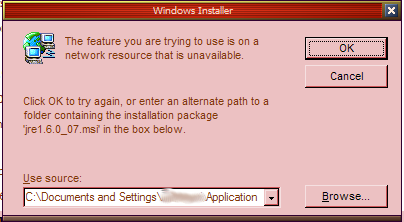
- Java runtime v7. I'm already on 11 or some such, so why is 7 still mentioned in the list of installed programs? Because it can't uninstall. Why? Because it uninstalls by installing itself... and requires the whole installer package for that, which it placed in my smallest partition, never used it again, and now it wants it. Except I deleted it long ago - it kept cluttering my c: partition, which is like a common tree that each dog wants to pee at, and it's always on the verge of running out of space. Why the fuck does every Jack, Joe and Marry want to stuff stuff into my c:\documents and settings? My document directory is somewhere else, on my Q: drive, which has a few hundred gig, regularly registered at app level. It actually goes there when I click browse (as if I would keep the installs together with my other documents, silly Java). So I cancel and get "The installation source for this product is not available. Verify that the source exists and that you can access it."... as if I wanted to install it, not uninstall.
- Toad for SQL Server - it's looking for its installer (yes, another .msi) at C:\DOCUME~1\xxxxxx\LOCALS~1\Temp\ - nice. First, note the elegant use of short names. Second, they place the (un)installer in something they call ...\Temp\, and then expect me to keep it for a year (Toad is reinstallware, i.e. free but it tries to call home on every launch, and you have to reinstall annually) so it would know how to uninstall.
- Amazingly, the Gugao Earth uses MSI installer (!), and it can't uninstall because it can't find its installer.
- SnagIt 9.1 didn't vanish when I installed 9.1.2 - but at least it decided to let me "wait while the installation is being configured" (when was "delete" declared politically incorrect? "Ceterum censeo, Carthaginem esse reconfigurandam").
- Tortoise SVN uses the same tool, by the GUI I'd guess it's an older version of IS, or it could be Inno. Also requires reboot (because it hooks into the rightclick menus of the file selectors... which doesn't require a reboot to get started, so why now? - or for some other reason). It also requires pretty much any other app to be closed, about which it's adamant on install; on uninstall you can pass by clicking the Ignore button, which is cool but shouldn't be necessary in the first place. I guess it's Windows again.
A few apps done in Wise setup uninstall fine, even though it says "install" while uninstalling, and says "configuring your installation" while removing it, lying bastards, but at least they get the job done... well, in the case of SignDoc's demo, I'm still waiting. Maybe it will finish before I finish writing. Worse, it's modal, so I can't return to "add or remove programs" box. Um, it finished, sort of... one of those that require a reboot, which is ridiculous - but that's Windows. My Ubuntu box* reboots only when there's a new kernel, everything else happens on the fly.
Probably the worst offender is the .msi, which generally gets unpacked into a temporary location, gets installed from there, and is then deleted - either automatically, by the install process itself, or by me, when I run out of space on the C: partition. The end result is junk files which take up space - which is probably not a problem nowadays with the terabyte drives at 100$ - and clutters the directory structure, which is a larger problem, and the apps which just can't get uninstalled without resorting to physical deletion of files and cleaning up the mess left behind in the registry.
The champion here is Inno - all it needs for the uninstall is the simple uninstall.exe, which resides in the app directory, and one dat file, less than a megabyte altogether, containing everything that the install has done - registry, ini, shared files, private files etc. It's in the same place where the app is, no need to look at obscure (and probably hidden) directories deep below user's home directory.
How hard can it be, m$?
----
* only nezavisni at the time
Mentions: Notes on grammar, spelling and other witchcraft, blogue, Gugao, Majkrosoft (m$), nezavisni, in serbian
1-IV-2026 - 24-V-2026