Another shitty day, or rather three, fighting m$'s idiocy. For it was written, in the blogue...
It's a pretty straight copy/paste from the document I wrote in LibreOffice yesterday, then posted in the blogue. All this just to keep zmajček up and running.
From what I can see, reading this eighteen years later, I wanted to do something in Word (maybe for Paige, the vague reference fits), and even bought a new Office (home & student, 125$), it asked for SP2 of XP and that's how the trouble started.
Windozaster recovery log.
Prelude (aka foreplay)
Warning: this is long. It took two days to live through, another day to put notes together.
I actually do all my writing (including this) in OpenOffice, unless it's in an app that I wrote. I keep MS Office installed just for the odd case that sometimes sending PDF or RTF doesn't suffice, or that my app may need to do some automation. So it happened this time that I needed to write a fix for something that happened to a customer's customer – two reports (had other errors that I fixed two weeks ago but also) wouldn't run under Office 2007 (aka 12). So I bought the Home/Student version (I hope they don't mean that it's for homeschooled ;) and tried to install it. Not right away, it arrived two weeks ago. I had a strong hunch that this won't go well, because I'm on XP SP1, running bbLean (not Windows Explorer) as a shell, have disabled any updates years ago, have a non-US codepage (for those who don't know, that's when your date isn't the ass backwards mm/dd/yy, and when your day has 24 hours at once, not twice twelve, and when you use other languages too) (anyone who says it's „military time“ go kneel in the corner for ten minutes – peace be with you, there are civilians all over the world who have learned that without ever doning a uniform(1)).
So I inserted the CD from the orange box and ran setup (of course it didn't run automatically – the autoplay survives about 5 minutes when I install any of the Windowses, which then made it impossible to install a driver for HP's scanner... 2nd part of setup wouldn't load without autoplay).
---- [this part written in notepad] 16.03.2008 18:40 time 0:00 - Setup is unable to proceed due to the following error(s):
To install and use this product on a computer, the computer must run at least Microsoft Windows XP Service Pack 2 (SP2). To install and use this product on a server computer, the server must run at least Microsoft Windows Server 2003 Service Pack 1 (SP1). Correct the issue(s) listed above and re-run setup. ... OK
So it won't allow me to run Office 2007 because it needs a few hooks (2), so it can call home to check whether I paid. OK... if nothing else works I'll just reinstall SP1 from scratch after trying to uninstall this thing first. Any piece of junk which tries to call home will get slapped by my firewall.
0:08 - 18:48 - took the download from http://www.soft32.com - at least gets me to m$'s download site faster and the speed isn't that bad either - around 700 KBps. Not as slow and roundabout as m$ (as I remember it). Just 266 megs.
0:14 - 18:54 - start installing SP2.
0:25 - 19:05 - Getting „migrate.exe - Entry Point Not Found --- The procedure entry point GetIUMS could not be located in the dynamic link library MSDART.DLL“ (3). he trouble is that this is a modal dialog, called from another modal dialog – and this underlying dialog is the setup one, where I have already clicked Next and all the buttons are greyed out except, guess what, Cancel. Ooops... not Cancel, that would be too normal. It's Help that still works, as if 50% into the install I still want to read which button to click, Next or Cancel. Since it took so long, I started playing Lines, and probably clicked out of the game and hit this Help button. Which bangs in some apps, if they try to gather help info from several sources – from help.ms.com or some other – which is not an option in the one I got; it was there once during the beta of something, and this is the version that came up when I uninstalled. It's a nuisance, specially in VBA (often need that in Excel, see first paragraph), but after clicking 6-7 times on a similar dialog, it goes away.
Not so easy here, because this top-level modal error window came up in an endless loop. Why? Well, we obviously can't have the setup continue to do who knows what sort of mischief while the poor user is waiting for help. So the setup will just sit there indefinitely until the help is done. Which it won't be, because of the endless loop – clicking to close the dialog just brings it up again.
Had to call the bouncer. Wasn't that easy to kill.
0:32 - 19:12 - restart setup for SP2. Seems to go fine. Moved it to the opposite end of the screen while I played. asks for reboot.
----- begin part I later retyped from paper notes.
0:50 rebooted... almost. After few minutes of "setup didn't complete - restoring previous configuration", it blacked out. The first run of the setup wrote somewhere that it had started, but since I had to kill it, it didn't erase that; the second run never wrote that it finished, so it was all in vain. Wasn't reported, didn't happen. System thinks there's more setup to be done, setup thinks not so.
0:52 rebooting by force. Boot menu is somehow at 30 seconds again, although it supposedly didn't manage to install anything. Doesn't get far, gets stuck in black (not bsod (4), just black).
0:54 rebooting with last known good config.
0:57 rebooting in safe mode after a full power off. Stops at mup.sys. Looking up SP1 CD.
1:03 reinstall XP SP1 (just repair).
1:17 it finished copying files to recover from
1:18 reboots automatically. Sys system is not fully installed, please run setup again.
1:20 reboots into „setup is being restarted“ (not „setup restarts“ nor „setup is restarting“ nor „restarting setup“ - nope, it's that specific phrase. I wonder why). Soon it says „system is is not fully installed, please run setup again.“, so round and round we go.
1:22 reboot to XPSP1 CD
1:26 got into admin console, but it has no rights to N:/installs (!) which is now actuallyH:/installs, so the attempt to load SP2 from here has failed. Exiting console reboots.
1:49 fresh install at 95%, now going into c:\hr (at least it isn't c:\windows again, the most obvious location – it didn't even ask last time) (10)
1:50 reboot
1:57 it's installing windoze
2:05 selecting the input locale, entering the 25 character code. Prognose:29 minutes more
2:09 asks for CD
2:13 19 minutes more
2:16 19 minutes more
2:17 18 minutes more
2:17:40 16 minutes
2:20 5 minutes
2:20:50 reboot (auto)
2:22 going through wizard dialogs
2:36 restoring the disk letters to what they were. Hav to change the location of the swap file so I can renstore the letter for the drive where it was. Every drive but C: had a wrong letter (and c: should have been D: but that was hosed by one of previous installations and I just gave up). Screen resolution at 1024x768 on both monitors, better than 640x480 ;).
2:42 before retrying everything, try to reboot into the old one, just in case. No worky.
3:00 halfway through moving MyDoc directory (settings etc – the actual docs are on n: drive).
3:10 checking what of software works. fox can't find msvcrt*.dll. Thunderbird, Firefox – work off the bat but no net. Ping router, no NIC. Can't install, need drivers.
4:18 reboot, because I installed msInstaller 3.0; SP2 asked for extra 184M on c:. moving the old n:\installs\winnt (before this, didn't make a note then.)
4:20 trying to run sp2 with the nic still unknown (5)... not too bad, seems to work.
4:32 reboot for sp2
4:34 wizard again, wants me to turn auto updates on. That's what I had to suffer from this point on.
-------------- end copy from paper notes
5:08 will try to download drivers for the NIC from asus.com, using the memory card from the camera for transfer and wife's laptop as the downloader.
5:40 got some drivers but then XPsp2 on the laptop suddenly decided to stop recognizing the card.
5:45 installed something (flashed the BIOS?) and the sound card. Wants to reboot. OK...
5:56 sound works. Still downloading the other stuff.
6:12 finally managed to copy the drivers into the card, it kept timing out until I unplugged the printer and plugged the adapter's cable in its jack.
6:20 running nVidia's drivers for the chipset. Hopefully this gets me the network.
6:22 error trying to install nVidia's firewall, but the rest should be there. nic is in the device manager.
6:30 simtel.net is from now on permanently blacklisted AFAIC. I wanted to download sygate firewall, got their adware under the link.
" To download Sygate Personal Firewall please select one of the download sites below. For best download speed you might consider selecting a mirror site close to your location. ... Worldwide Content Distribution Network" - this line is a link. Maybe it wasn't one of the mirror links, but then it shoulnd't have been listed there. The text should go "no mirrors carry this file" or summat.
6:34 tucows has a link which doesn't work - no dl happens. there's a link to sygate, though, but it goes to the worst place possible (save Microsoft itself) - Symantec... who bought sygate and killed the fine product (6).
6:36 finally, at download.com, there it is.
6:43 reboot because of sygate firewall
6:47 windows keeps nagging me about my security settings... as if I could trust M$ to handle my security. They can't be trusted, period. The funny thing, that cracks me each time, is "internet properties". Wow. I have a dialog where I can set the properties of the WHOLE INTERNET - all power to me!
6:59 sygate works, and the bona fide attempt to register it still works as well (11). OpenOffice just works, without any need to adjust anything (7). The things are where I have left them, and most of the things don't need to be re-entered. Maybe it still doesn't know all the shortcuts for longer words – that was to be expected.
Still to enable:
- fox 8 and 9
- sql server
- get new toad for sql
- find .rdp files and use them (12)
Day 2
Just noticed that the system clock is one hour behind. The daylight savings & loans started a week ago, and I've set it manually then (didn't want to load the patch). It seems to run the motherboard on physical time and add 1 to it? Hmmm...
0:09 ok, Skype works. Needed to reenter the password, but that's all.
0:15 found fox install and rerun the prerequisites, works now, including the environment manager. Found my .rdp files, can connect. Lost the passwords, though.
0:30 decided to install SQL 2005 Express instead of MSDE, but it requires to install installer 3.1 – which requires a reboot.
0:35 ok... now it requires dot net 2.0.
0:45 installed that... now 1.1 because Vault 3.5 will need that. Now why does 1.1 install in about 5 millijiffies while 2.0 took a number of minutes (and I haven't started the stopwatch on time).
0:48 third attempt to install sql06ex
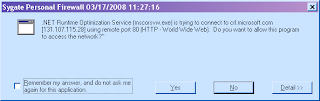
0:49 installed prerequisites and then tried to call home – dotnet optimization services. Slap hand, go on.
This happened some six or seven times. Gave it a permanent no-go rule.
0:54 finished answering questions, now it really installs.
1:00 done. Toad doesn't work, got to load it once a year anyway. Still had 120 days on it. It's a freebie anyway.
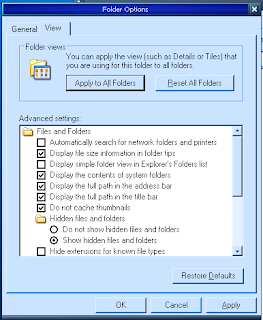
1:04 had enough of hidden extensions on every file selector (the remnant of the windows explorer that I still must use)... so here goes, the usual:
By current count, about 10 of these start off wrong (for me). I can't even imagine how many times did I have to go through this list. It's mostly the number of things it hides, or the way it takes away screen space to display something that can go into a tooltip, or the way it never really stores the layout of directory display. Which are all the good reasons I'm not using it at all, but it still shows up in file selection dialogs. (8)
Note that there is no context help, nor help at all, so this works on experience only, by trial and terror. There's no place where you can check, while filling this, what's the difference between „simple folder (13) view“ and „complicated folder view“ (or is it a „display or not“ checkbox?), what does trigger the automatic search (and when will it not work if I keep this unchecked)
1:10 toad loads, then optimizes. May take a few minutes.
1:23 reboot – just in case. Toad wouldn't run, because some file was wrong version – probably leftover from the previous one that the installer didn't quite catch. Uninstalled, and now installing again.
1:34 toad has 0 seconds remaining and just sits there. Something is trying to contact me from sun.com. After a couple more questions from the firewall, it deigns to show up.
1:38 of course, both databases I had are hosed. Now to restoring them. Of course, I have deleted the zips, have to download again.
fox's environment manager is there except for the stuff which was kept in registry – and I probably have a backup somewhere but didn't make one recently. Surely didn't expect that installing Office would screw up everything. Did expect some shit – which is why I had a stopwatch and notepad (exe, and some loose paper) ready.
Fixed c:\boot.ini to not point to the old c:\windows, but that directory persists – can't delete it just like that. Persistent file c:\WINDOWS\system32\Macromed\Flash\FlashUtil9d.exe and c:\WINDOWS\system32\Macromed\Flash\Flash9d.ocx. Although Flash plugin is not installed for the Firefox... do that now – ok, got flash but still can't delete these two. Console, maybe?
Will have to reinstall GIMP – lost GTK. It's there, but it's inaccessible.
Vault client works, except that it's lost the profiles. With our passwords.
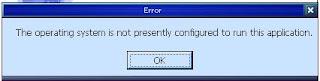
Tried Visio... this is funny:
Obviously it's not that the app needs to be reinstalled or any of such, it's the OS that's at fault.
Trying Word. First,
(The document contains macros. Macro language support for this application is disabled. Features requiring VBA are not available. Would you like to open document read-only? (9))
I'd somehow expect a "would you like" question to be answered with "yes/no". Or was it at the weddings that they were supposed to say "OK"?
Then once again the same dialog, second time with Word open in the background. Clicking OK again,
Now you tell me :). And if it wasn't installed for the current user, why did I see it come up at all? You're so bad at lying, Microsoft... Actually it was installed, several times, and had to be installed over and over after each OS crash.
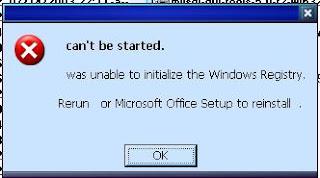
Next, a nameless app called Access says
Just like the same old „what is faster – or a dog?“. Also quite unclear why should „“ be in charge of initializing the registry. Shouldn't Windows do that?
And TaskManager has forgotten all the settings. Ummm....grrrr.
Trillian works as if nothing happened. AusDefrag too. Good.
Sony's RecordNow! app for dvd burning is lost. It lost px.dll, and when I moved it from old w\system32, it weeped „An error occured while trying to initialize RecordNow!. Please re-start your computer. If the problem persists, please re-install RecordNow!.“ Whiner.
Recap
Whenever you add a Microsoft product/OS to a Microsoft OS, expect nasty surprises. I'm fighting this for nineteen years now, and don't say it lightly. Unless you're ready to forfeit your machine and let them run it for you (read: cede control), which I've seen done, and it may even work as long as you're doing just standard stuff (14). The moment you do something unorthodox, you're toast, and both the amount of time and damage you'll suffer to the point when you eventually get things up and running are growing exponentially with your heresy.
For me, it was this: no Windows Explorer in use; bbLean is my shell; Central European (AnsiCodePage=1250, OEMCP=852); main keyboard layout not US/English; date format dd.mm.yyyy, 24hr day, disk partitions labeled c, f, m, n, o, q and the DVD on x, Outlook Express and NetMeeting exterminated, updates disabled, using freebie AV and firewall software, TotalCmd for file operations (no WEx, really, only in Control Panel sometimes), and Open Office opens .doc and .xls files. Any of these could be part of the cause, but I figure this time it was just the bad setup for SP2... and why the Friday does Office 12 require SP2 at all? Anything there that it couldn't install itself? Or is it just a part of the larger (tie-in) picture?
In the end, flowers, demerits, blacklisting, and counting the boots.
Flowers (for running without reinstall) go to Mozilla Firefox & Thunderbird (lost nothing, had to readjust font size for mail viewing); Trillian (reconnected without missing a beat), Foobar (everything in place), OpenOffice (everything there – styles, recent documents, had to restore file associations, can't find dictionary), fox (had to move msvcr*.dll and something had to install a missing OCX for data explorer – Windows will not say which ocx is missing, which is so helpful); AusDefrag didn't miss a beat; KMPlayer too, dosbox perfect.
What got lost and had to be reinstalled: MSDE – wanted to replace it with SQL 05 express anyway; Toad for SQL; Sony's RecordNow! for DVD frying (looks like a pancake, goes into a fryer – fry then, not burn); Brother's printer/scanner stuff (which is very dirty, btw, insists on placing a c:\brother directory). It tried to call crl.microsoft.com while installing, I firewalled it and it stopped. When I canceled it, it sort of continued, complaining. It could be that it's using Microsoft's latest installer that I just had to install because of something, and that guy insists of calling home. What would happen with the world if Microsoft was unable to know what I install? Anyway, printer works, scanner works.
Permanent blacklist: Simtel, for pretending to offer download of SyGate firewall and then not even bothering to check whether there are any actual locations where it exists, so you get to download their adware instead.. Demerit to Tucows for sending me to Symantec – the last place on Earth for SyGate, actually the big bad company which buys good products and turns them into bloatware which does less useful stuff than the original.
This was seventeen reboots, about two of which were voluntary. Didn't count what and how many times tried to call home, because most of it was disabled on second or third attempt.
-----
(1) this was often on UA, specially Nick, who'd call it military time, but that's without a colon and hours are pronounced as hundreds; this means the poor guys never saw a 14:30 on a clock
(2) from SP2, which introduced some mandatory updates and removed a few other choices; known fact at the time
(3) OS files are still in 8.3 format because they need to be installed before the long-names-add-on is installed, so initially long names aren't there at all; this was changed later but the short naming persisted for years
(4) the infamous blue screen of death, many people saw it often
(5) this is just repair and SP2 and it loses the network card driver? wow.
(6) like they did with Norton's and McAfee's apps and a few others, effectively turning them into viruses
(7) the reason they survived is that ever since 1990., copying what Fefi was doing on unix/xenix, I never put any of my stuff on the system drive/partition; the trouble with XP is that the partition changed letters often
(8) this never got fixed, the list only got longer as they added features, and maybe one in six would have a default with which I'd agree
(9) there's a setting to allow macros, inside each app separately, but they don't tell you that, just „is disabled“ - where? Took me half an hour of search to find it out the first time.
(10) this is the last of the Windowses which could be installed elsewhere. There's too much software out there which thinks it knows where the system is, instead of looking for %system%
(11) The product being dead, there are no new versions, and it's a happy accident that they didn't insist on registration. An attempt suffices, it gets nowhere and keeps working ever after. When I later switched to 64-bit systems, I had no firewall at all, because there was no 64-bit version of this, and all others considers calling home not worth a notice, specially for big players (m$, Gugao).
(12) the settings for each remote desktop connection were stored in those files. Had some fifteen of them, for each clinic where we remoted that way
(13) now look at that, a folder, gone the way of mac and atarist... and in dos window the command is... DIR.
(14) the only person I know sticking to that „feed the pigs and don't touch anything, they know what they're doing“ is Škrba, and he'll claim that the m$ may be assholes, but their stuff works, just tie yer horse where boss says.
(15) couple of years ago I managed to make XP work without a C drive... boy, did I catch a load of dirty written apps...